Association de Soutien pour l'Enseignement International de la Côte d'Azur - France
 English (UK)
Association de Soutien pour l'Enseignement International de la Côte d'Azur - France
Association de Soutien pour l'Enseignement International de la Côte d'Azur - France
Here are links to instructions for common problems:
You will find it in a PDF, in the Documents section of your École Directe account.
even when I am already logged into a Gmail account and I have to log into multiple accounts on the same browser.
I want to transfer my child's emails to a new email account.
If you have forgotten your password, you can reset it by following the recovery procedure recommended by Google , using the parent's email address. For added security, we recommend linking an emergency phone number.
Note: If you don't remember your student email address, you will find it in a PDF, in the Documents section of your École Directe account., here .
If you encounter any screens not mentioned in this tutorial, please send a screenshot to google_help@aseica.org, along with an explanation of the steps you took. Thank you!
Go to https://mail.google.com
Do you see a window similar to the screenshot below?
NO → skip to step 2
YES → proceed to step 3 (Ignore step 2)
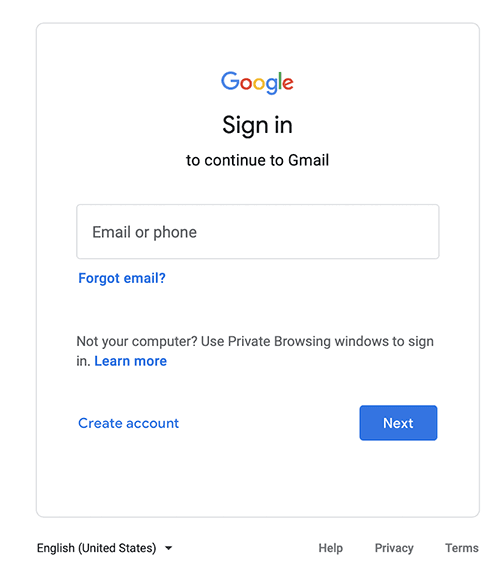
(not necessary unless you get a screen like the one below)
This message appears if you are already logged into one or more Google/Gmail accounts in your browser. You must add the Aseicq account to easily switch between all your Gmail accounts.
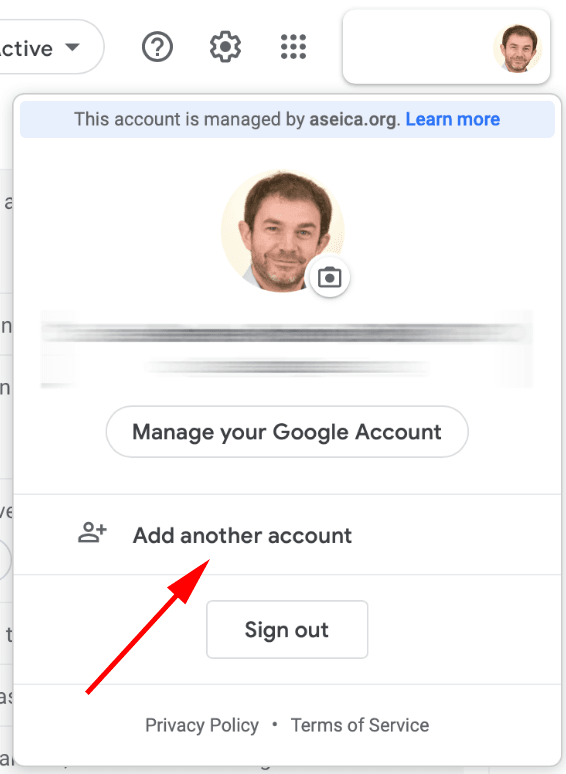
Click on your profile picture/logo in the top right corner of the screen.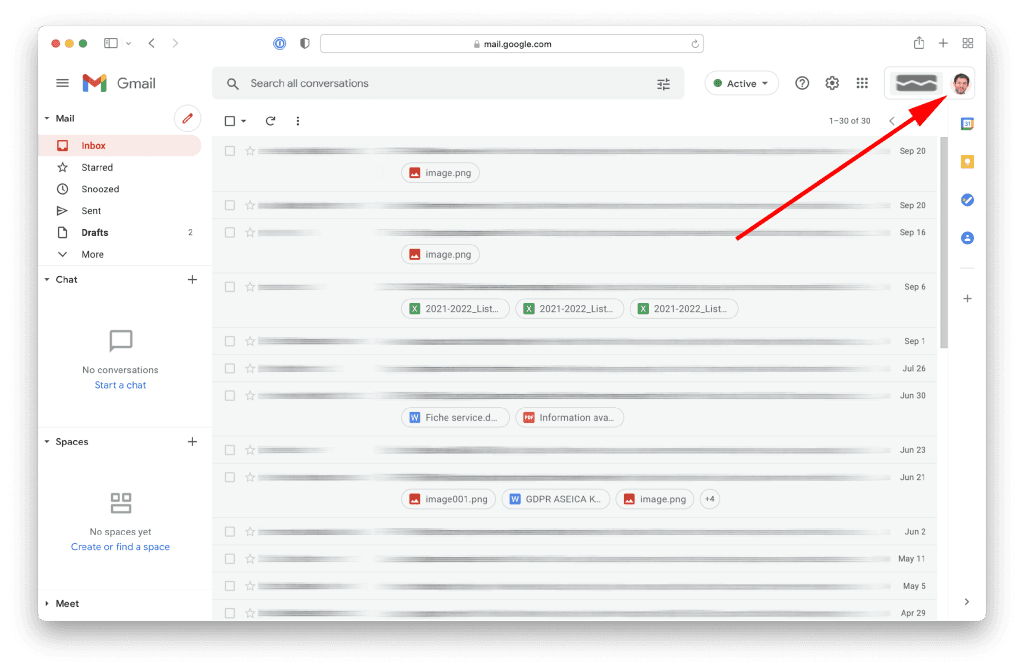
In the window that appears, select "Add another account".
(student.XYZ@aseica.org) and click on "Next".
Follow the instructions on the following pages (password, accept the terms and conditions, change your password, etc.). That's it!
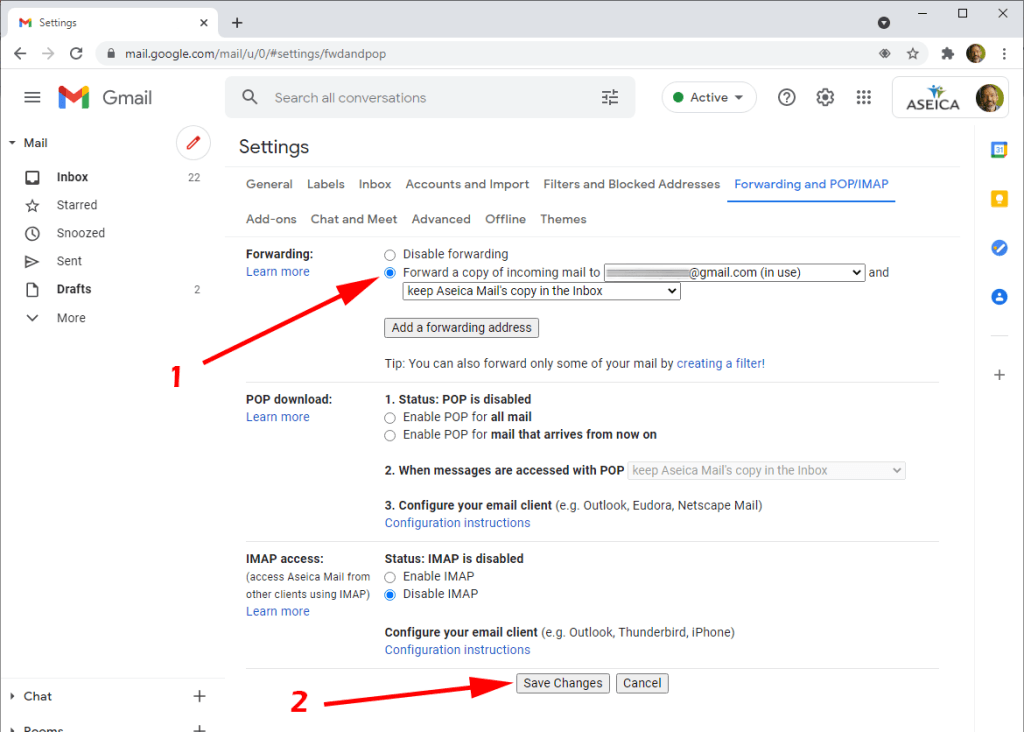
To simplify account management, you can transfer your child's emails to another existing account.
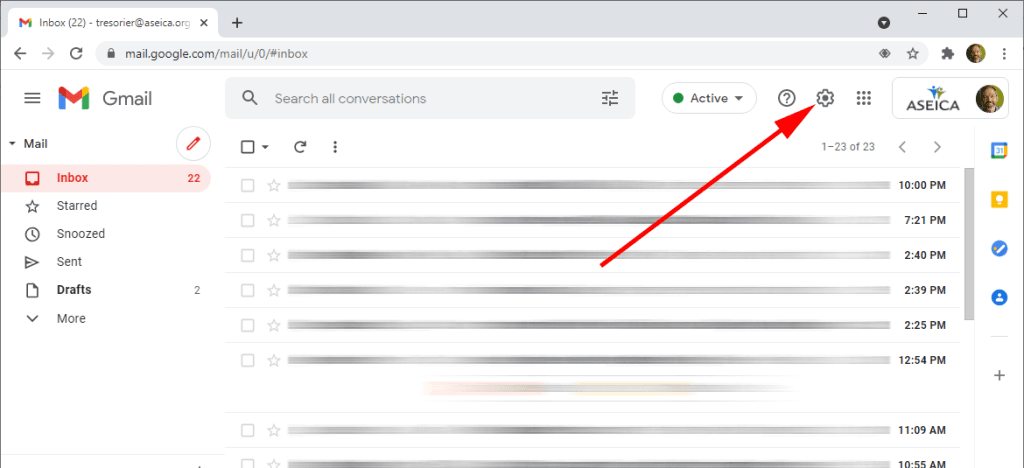
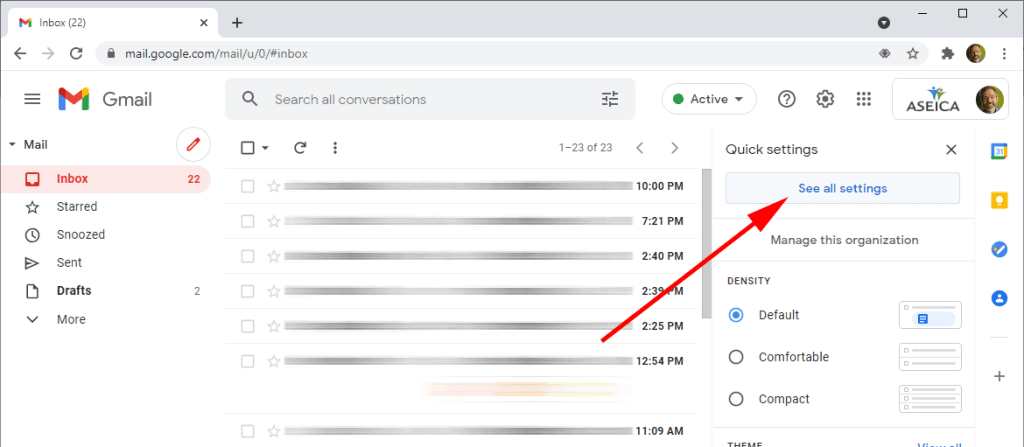
2. Click on "Show all settings"«
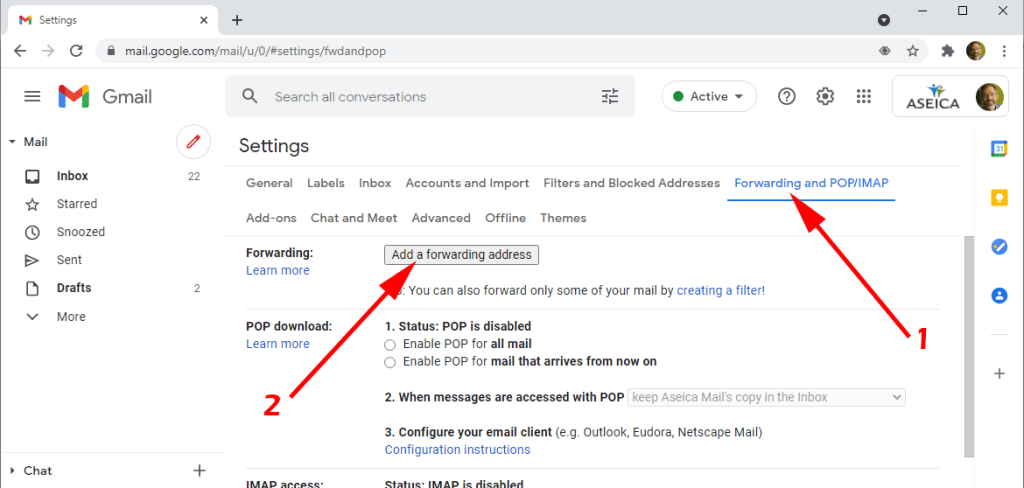
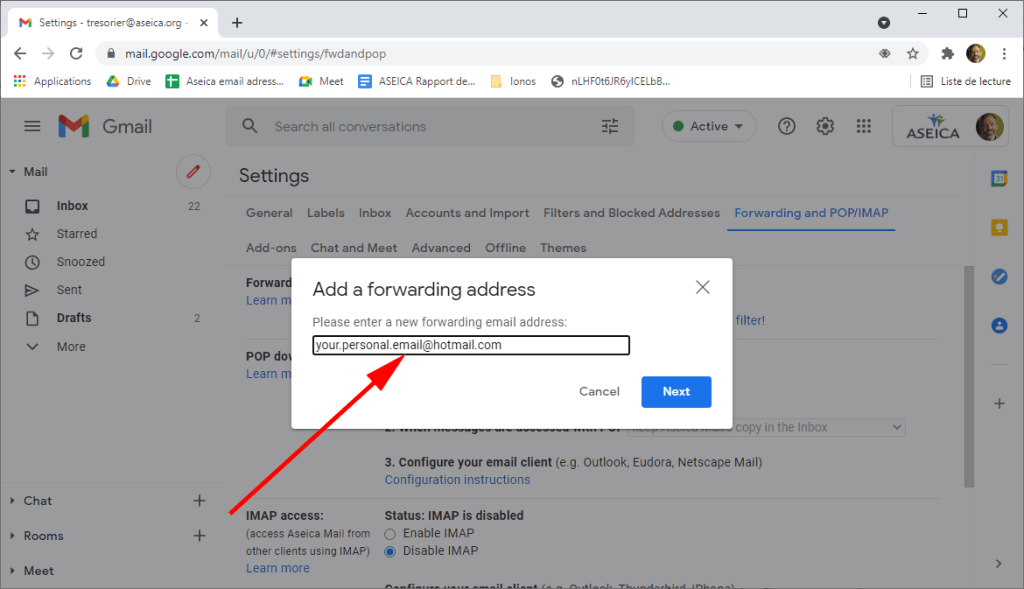
1. Enter your email address and click "Next".
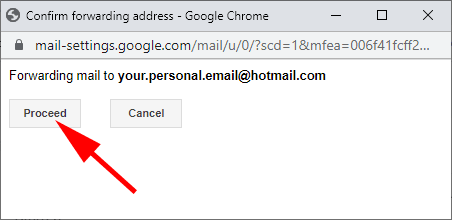
2. Click on "Continue" on the pop-up page.
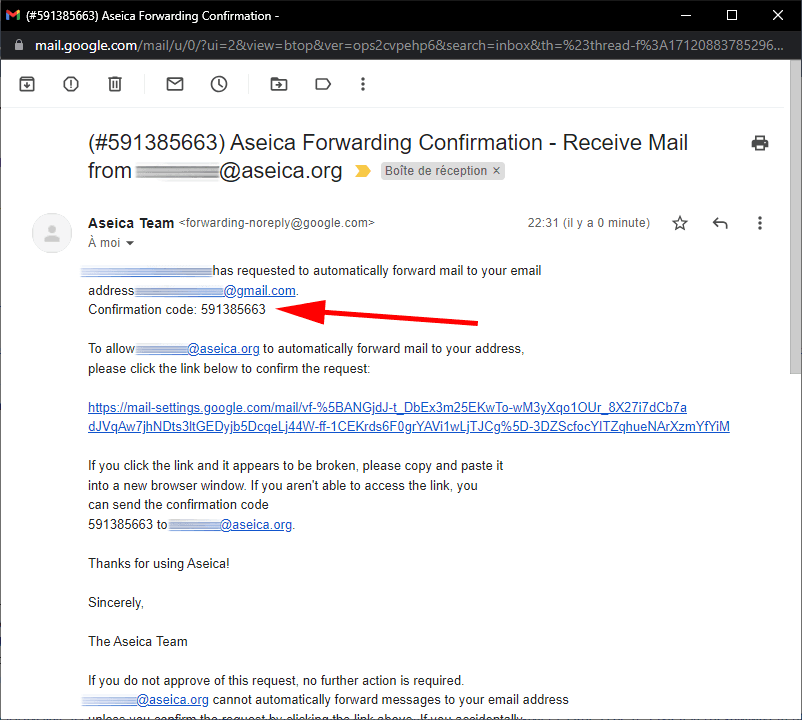
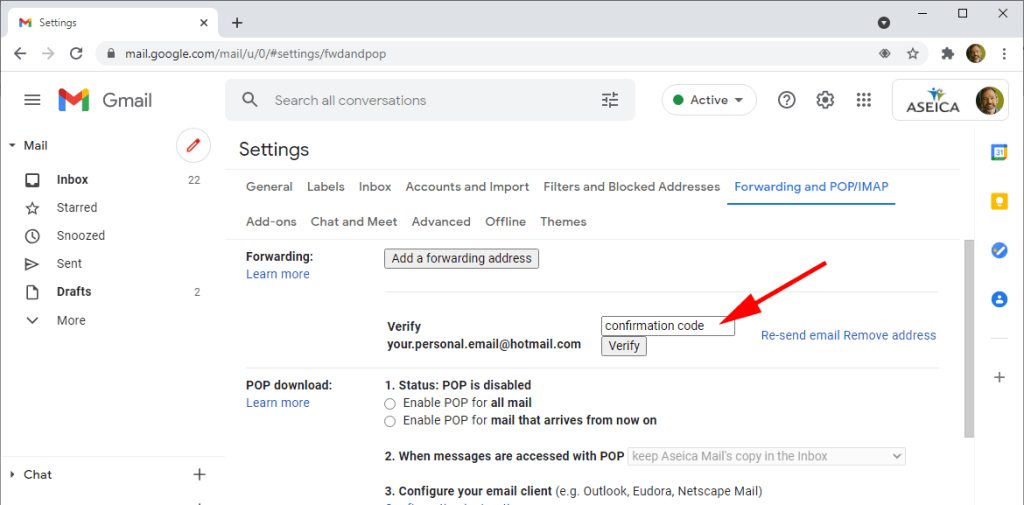
Check your emails for the code, or simply click on the link:
ASEICA is a association under the 1901 law which employs English-speaking teachers and supports international education within the French National Education system on the French Riviera. It is funded by tuition fees and family contributions.
To offer bilingual education French–English excellence, coordinated with partner public institutions (schools, colleges, high schools).
International openness, linguistic and cultural diversity, kindness and academic rigor.
The ASEICA teachers ensure English, National Education teachers ensure French; The school administration manages registrations and tests according to the academic framework.
He guarantees non-profit, the flexibility in recruiting English-speaking teachers and a governance close to families.
Programs aligned with French requirements with a strengthened English component, opening up international pathways in secondary school.
By aligning with French frameworks (academy / MEN), the recruitment of qualified teachers and international standards of good practice.
Biliteracy, intercultural skills and preparation for studies in France or internationally.
Through transparency of procedures, a sliding scale internal to secondary education and associative actions.
More than 40 years old action alongside the National Education system.
Distribution balanced approximately half in English (ASEICA teachers) and the other half in French (National Education), i.e. ~12 p.m. per language/week.
Language/literacy, interdisciplinary projects (science, history, arts), communication and critical thinking.
Yes. The international sections are part of the French timetables/programs with specific adjustments.
Best practices of’IB PYP (transdisciplinary learning, learning community) and of the CIS (quality of learning and well-being).
Research shows positive effects on reading/math and lasting learning for students in immersion.
Yes, the SIs frame the disciplines and the language towards French certifications/exams with an international dimension.
Team coordination to ensure continuity of progress and consistency of projects. (Requirement present in IB/CIS frameworks).
Yes, the level-based organization and co-intervention promote adaptation to diverse bilingual profiles.
Yes: French, math, science, PE, arts… taught according to national programs.
Language support systems exist for FLE/EL depending on the academies, within the framework of the SI.
Nice Academic Inspectorate : joint procedure for Sartoux (Valbonne) and Trois Collines (Mougins).
THE tests and results They fall under the jurisdiction of the Academic Inspectorate/DSDEN; ASEICA does not organize the tests.
Conditions published annually (age, residence in the academy, non-reproduction of tests, etc.).
Interview/test of language intended to assess the ability to follow specific courses; documents to be provided (municipal registration certificate, etc.).
Only if places become available; otherwise, recruitment focuses on the 6the.
Continuity towards the international high school from the academy (e.g., LIV) according to the procedures in force.
A French baccalaureate integrating teaching/assessments in the language of the section (LLCE and DNL); aims for a high level of bilingual/bicultural competence.
Two tests: French And section language; oral in CP (≈30 min), written introduced progressively at higher levels.
No, No program or past papers Official figures are not published.
Good level in both languages, especially for entrances on upper levels (limited places).
Yes, verified during test registration.
Opening according to the capacities of schools/municipalities and the academy; updates via academic channels.
ASEICA provides the English teachers; the school administrations handle administration/registrations/tests.
High requirement in French/English; information published by ASEICA and partner institutions (e.g., CIV).
Each year via the academy (e.g. calendar and FAQ CP/elementary).
Managed by the DSDEN; allocations possible after withdrawals.
Alternating French and English during the week, cross-curricular projects and international classroom life.
English-language cultural days (e.g., “Anglo Day”), seasonal festivals (Halloween/Christmas) and community projects. (Recurring elements on the ASEICA primary pages).
Yes, on 4 days (Mon, Tue, Thu, Fri) depending on the schools in the area.
Strong involvement from families (volunteering, events, donations), consistent with the associative spirit.
To fund English-speaking teachers and supplementary activities.
International standards (IB/CIS) emphasize well-being, inclusion and appropriate workload.
They consolidate academic vocabulary and oral/written skills in authentic contexts.
Yes, within the framework of French programs, some projects can be carried out in English.
Linguistic adjustments are possible depending on the local academic framework.
Depending on the year/establishment, the association may organize additional activities (subject to financial regulations).
Students, families, ASEICA teachers, public school teams, alumni, volunteers.
Volunteering at events, participation in community life and financial support (donations).
Themed days, cultural festivals, charity projects and community events.
Yes: students multicultural speaking several languages; this diversity is a pedagogical asset.
Through ASEICA/establishment channels (website, communications, secretariat).
Adherence to values, respect for academic procedures and reasonable participation in associative life.
The community brings together alumni and families; the association promotes inter-level connections through its activities.
Transparency, co-education and a clear timeline for admission and payment steps.
Via the forms/contacts provided by ASEICA for association activities and by the institution for school activities.
On the ASEICA pages Admissions and on the publications of the Academy of Nice.
| Annual membership fee | Fees for a first registration |
|---|---|
| 150 € | 500 € |
| Once a year per child | The year in which the child, or the first child in a family, joins the English-speaking section for the first time, in order to confirm registration |
| RFR + / Tax units* | Primary school | Variation |
|---|---|---|
| 0 to 7,500 € | 2 846 € | - 15 % |
| €7,501 to €15,000 | 3 013 € | - 10 % |
| €15,001 to €22,500 | 3 181 € | - 5 % |
| €22,501 to €30,000 | 3 348 € | Standard |
| €30,001 and above | 3 683 € | + 10 % |
* Reference indicator: Membership in a tariff bracket is determined based on:
(Household reference tax income + family allowances + state scholarship (middle/high school)) ÷ Number of tax shares in the household
| RFR + / Tax units* | College | Variation |
|---|---|---|
| 0 to 7,500 € | 1 900 € | - 15 % |
| €7,501 to €15,000 | 2 012 € | - 10 % |
| €15,001 to €22,500 | 2 124 € | - 5 % |
| €22,501 to €30,000 | 2 236 € | Standard |
| €30,001 and above | 2 459 € | + 10 % |
* Reference indicator: Membership in a tariff bracket is determined based on:
(Household reference tax income + family allowances + state scholarship (middle/high school)) ÷ Number of tax shares in the household
| Echelon | Prices |
|---|---|
| level 1 | 1 722 € |
| level 2 | 626 € |
| level 3 | 0 € |
| RFR + / Tax units* | High school | Variation |
|---|---|---|
| 0 to 7,500 € | 2 497 € | - 15 % |
| €7,501 to €15,000 | 2 644 € | - 10 % |
| €15,001 to €22,500 | 2 791 € | - 5 % |
| €22,501 to €30,000 | 2 958 € | Standard |
| €30,001 and above | 3 231 € | + 10 % |
* Reference indicator: Membership in a tariff bracket is determined based on:
(Household reference tax income + family allowances + state scholarship (middle/high school)) ÷ Number of tax shares in the household
| Echelon | Prices |
|---|---|
| level 1 | 1 557 € |
| level 2 | 1 233 € |
| level 3 | 940 € |
| level 4 | 617 € |
| level 5 | 323 € |
| level 6 | 0 € |
Degressive scale indicated by level (e.g. –15%, –40% depending on child's rank).
Yes, they can change annually: refer to the official page and the “Financial Commitment” documents.”
Yes; the fees concern the English-speaking international section funded by the association.
An internal sliding scale is mentioned for secondary education (according to association news).
Details are provided annually by ASEICA (schedule, registration fees).
Yes, through bilingual skills and international culture, consistent with IB/CIS pathways.
The SIs are authorized by the MEN, based on agreements and strict criteria (teachers, partnerships, schedules).
Bilingualism and international standards facilitate inbound/outbound family mobility.
Continuity of bilingual course in secondary SI, subject to admission procedures.
Improved average performance in literacy/math and lasting effects of immersion.
The SI courses lead to international options for the brevet/lycée or to the BFI depending on the streams, within the framework of MEN/AEFE.
The CIS standards place the global citizenship and well-being at the heart of the evaluation.
Yes, the SI system typically meets the needs of international/expatriate families.
Yes, they anchor the academic vocabulary of the disciplines in English from primary school onwards.
Reference frameworks IB/CIS provide quality benchmarks that are widely recognized worldwide.
Nice Academy / DSDEN, public institutions (schools/colleges/high schools)
MEN/éduscol texts: organization and specific SI programs at school/college/high school.
Yes, historically integrated into local public operations for over 40 years.
By the donations (tax deductible under certain conditions), volunteering and participation in events.
To fund English-speaking teachers and the international part of the program, within the public system.
Standards CIS and approaches IB (curriculum, learning, well-being, global citizenship).
Yes, the association speaks out when reforms impact the local international section.
Via the ASEICA contact details published on the website.
Yes, each public institution retains its management and administrative responsibilities.
Yes, on competition/test and according to the school map/available places.
For teaching positions in the English-speaking international section, a excellent level of language is essential:
For the English-speaking teachers, a level native or near-native fluency in English is expected, as well as good oral French skills for communication with teams, families and the institution.
For the French-speaking teachers, A very good level of English is recommended, in particular for working in pairs with English-speaking colleagues and supporting bilingual projects.
However, we are not only looking for a specific language level:
there pedagogy, The desire to work in an international context and the ability to collaborate in a team are equally important.
ASEICA's needs may include:
of the full-time positions,
of the part-time positions, depending on the levels, subjects and projects.
Some teachers work across several partner institutions to cover their required teaching hours.
When applying, don't hesitate to Please specify your availability. (full time, part time, preferred days): this helps us to consider the best possible arrangement with our needs.
Yes. Many members of the ASEICA team have already experienced a transition between educational systems (British, American, international…) towards the French system, and we are fully aware of this.
For newcomers, especially foreigners:
we explain the how the French school system works (programs, levels, exams, calendar); ;
the new teachers are accompanied by experienced colleagues, who share their resources, sequences and best practices; ;
we encourage the’course observation and co-teaching at the start, in order to facilitate getting a feel for things.
The idea is not to be “perfect” from day one, but to progress quickly in a supportive and structured environment.
Yes, it is entirely possible to apply from abroad.
We regularly receive applications from:
English-speaking or French-speaking professors currently working in other countries; ;
teachers from international systems (IB, international schools, etc.) wishing to settle on the French Riviera.
Some important points to keep in mind:
you must be in compliance to work in France (residence permit or work permit if necessary); ;
depending on the position, a good understanding of the French institutional context is a real plus, but it can also be acquired gradually; ;
the initial interviews can take place via videoconference ; However, on-site presence will be required for taking up the position.